






Enterprise WordPress Hosting: What Large Organisations Need
Standard shared hosting does a reasonable job for a small business website with modest traffic and a handful of plugins. But when a large organisation depends on WordPress for a public-facing site serving hundreds of thousands of visitors per month, a customer portal handling sensitive data or a WooCommerce store processing orders around the clock, that kind of hosting falls apart under the weight. Enterprise WordPress hosting exists to bridge this gap, providing the infrastructure, security layers and support architecture that high-traffic, mission-critical installations demand. If your organisation is evaluating options, WordPress managed hosting services for organisations from a provider that understands the platform at a code level makes a tangible difference to uptime, load speeds and the ability to handle traffic spikes without breaking a sweat.
Most providers just slap the “enterprise” label on their priciest shared hosting without changing anything under the hood. But the real deal means properly isolated environments with dedicated resources and deployment workflows that work like modern software development. Getting this distinction right during procurement makes the difference between hosting that scales with you and hosting that chokes your growth. Our broader guide to choosing WordPress hosting in the UK covers the fundamentals worth evaluating first.
What Makes Hosting “Enterprise”
Enterprise WordPress hosting combines reliability, performance and security features for organisations where downtime costs real money. There’s no single checklist that defines it, but certain capabilities show up consistently across genuine enterprise platforms.
Isolated, dedicated resources stop you getting hammered by other people’s problems. Shared hosting means your site fights for CPU, memory and disk space with everyone else on that server. One badly coded cron job or traffic surge from a neighbour tanks your performance even when you’ve done nothing wrong. Enterprise hosting gives you dedicated or containerised environments where your allocated resources stay yours no matter what chaos unfolds elsewhere.
High availability architecture means multiple servers working together, not crossing your fingers and hoping one box doesn’t die. Load balancers spread incoming requests across several application servers so if one fails, traffic just flows to the healthy ones without any manual fixing required. Database replication runs on separate instances too, which means a database problem won’t kill your entire site. This setup backs the high uptime promises that mean something in enterprise SLAs.
Git-based deployments mean changes flow through version control instead of someone uploading files by hand via FTP. Staging and deployment workflows come standard here, which lets you test plugin updates, code changes and content migrations in an environment that mirrors production before anything goes live. That prevents the surprises that cause outages when you least need them. And organisations with multiple developers and compliance requirements need that auditability and rollback capability.
WordPress-specialist support makes all the difference. Engineers who understand WordPress internals and know how caching layers interact can diagnose performance problems without asking you to clear your browser cache first, which is what you get instead of generic hosting support staff reading troubleshooting scripts.
When Standard Managed Hosting Stops Being Enough
Starting with a managed WordPress plan makes sense for most organisations. Updates, backups, basic security and server maintenance get handled for you, which works well for ages. But there’s always a point where it stops being sufficient and it usually announces itself through one of several scenarios.
Traffic that used to be manageable suddenly slows your site down. Marketing campaigns drive spikes that bring everything down entirely. Your development team wastes hours on deployment workflows that involve FTP uploads and manual cache clearing. Sometimes a security incident on a shared server affects your site even when your account wasn’t the compromised one.
Upgrading to a bigger plan on the same architecture won’t fix these problems because you’re still dealing with shared resources, single-server design and limited caching. These signals tell you that your infrastructure needs have outgrown standard hosting completely. Base the decision on measurable requirements rather than just feeling like you need “something better.”
Infrastructure Requirements That Matter
Know what sits behind the marketing language when you’re evaluating enterprise hosting options. Load balancing spreads requests across multiple application servers. No single instance becomes a bottleneck and if one server fails, traffic gets routed automatically to the healthy ones.
| Component | Standard Managed Hosting | Enterprise Hosting |
|---|---|---|
| Server resources | Shared or semi-dedicated | Dedicated containers or instances with guaranteed CPU, RAM and I/O |
| Uptime SLA | 99.5% to 99.9% | 99.9% to 99.99% with financial penalties for breach |
| Scaling | Manual plan upgrades | Automatic horizontal scaling during traffic spikes |
| Caching | Plugin-based or basic server caching | Full-page caching, object caching (Redis/Memcached), integrated CDN |
| Deployment | FTP or file manager uploads | Git-based pipelines with staging and production environments |
| Security | Basic firewall and SSL | WAF, DDoS protection, intrusion detection, compliance certifications |
| Backups | Daily snapshots, limited retention | Continuous or hourly with extended retention and tested restore procedures |
| Support | Ticket-based with general hosting knowledge | WordPress-specialist engineers with SLA-backed response times |
Auto-scaling spins up additional server instances when demand spikes during product launches or press mentions, then releases those instances when traffic returns to normal levels. You only pay for peak capacity when you need it and the infrastructure handles adding or removing servers based on real-time demand.
Visitors load your images, CSS and JavaScript from whichever edge server sits closest to them instead of hammering your origin server. CDN integration spreads these static assets across servers worldwide and the performance boost for international audiences can be significant.
Object caching through Redis or Memcached keeps your most popular database queries sitting in memory ready to go. WordPress hammers the database constantly so storing those common results means faster load times for logged-in users and any personalised content.
Security at Enterprise Scale

Your hosting environment sits at the bottom of your entire security stack. But keeping plugins current, setting proper user roles and enforcing strong passwords falls on whoever runs your WordPress site. Infrastructure security is where your hosting provider either steps up or lets you down.
Enterprise WAF setups know WordPress inside out so they can tell the difference between someone legitimately accessing wp-admin and bots scanning for weaknesses. A web application firewall positioned at your server or network edge blocks malicious requests before they even touch WordPress, catching SQL injection attempts, XSS attacks and brute force login spam right at the gate.
The hosting environment sits at the foundation of every security decision. Get that wrong and nothing built on top of it can be trusted.
Every enterprise hosting setup needs DDoS protection built in. Commercial and public sector sites get hammered with distributed denial of service attacks that flood servers with bogus requests until everything grinds to a halt. The better providers partner with mitigation services that catch this attack traffic at the network edge before it even gets near your application servers.
Intrusion detection and monitoring keeps watch for activity like unexpected file changes, weird attack patterns showing up in server logs and behaviour that just doesn’t look right. Enterprise providers running proper security operations centres have dedicated teams watching alerts and jumping on incidents 24/7.
Regulated sectors can’t take chances with compliance certifications. SOC 2 Type II proves an independent auditor has checked your security, availability and confidentiality controls. ISO 27001 covers information security management systems. Working with NHS data or financial information means these certifications stop being nice to have and become absolute procurement requirements.
Performance Expectations and Core Web Vitals
Performance at enterprise scale means keeping response times fast and consistent when you’re under load, not just showing off impressive numbers on an empty staging environment. That page loading in 1.5 seconds with 50 people browsing? It needs completely different infrastructure to maintain that same speed when 5,000 visitors hit during your product launch.
TTFB measures how fast your server starts responding once it gets a request. Well-configured enterprise hosting with good caching should deliver TTFB under 200 milliseconds for cached content and that’s your foundation metric right there. Google’s Core Web Vitals framework tracks several metrics that your hosting performance directly affects, with Largest Contentful Paint showing you the clearest picture of server-side speed.
Your WordPress site can only handle as many simultaneous requests as you have PHP workers available. Standard hosting throws you four to eight workers and calls it a day. Enterprise setups scale dynamically when traffic spikes beyond normal levels, which means no more queuing when everyone hits your site at once. WordPress VIP’s scalability documentation explains the architecture behind this elastic capacity.
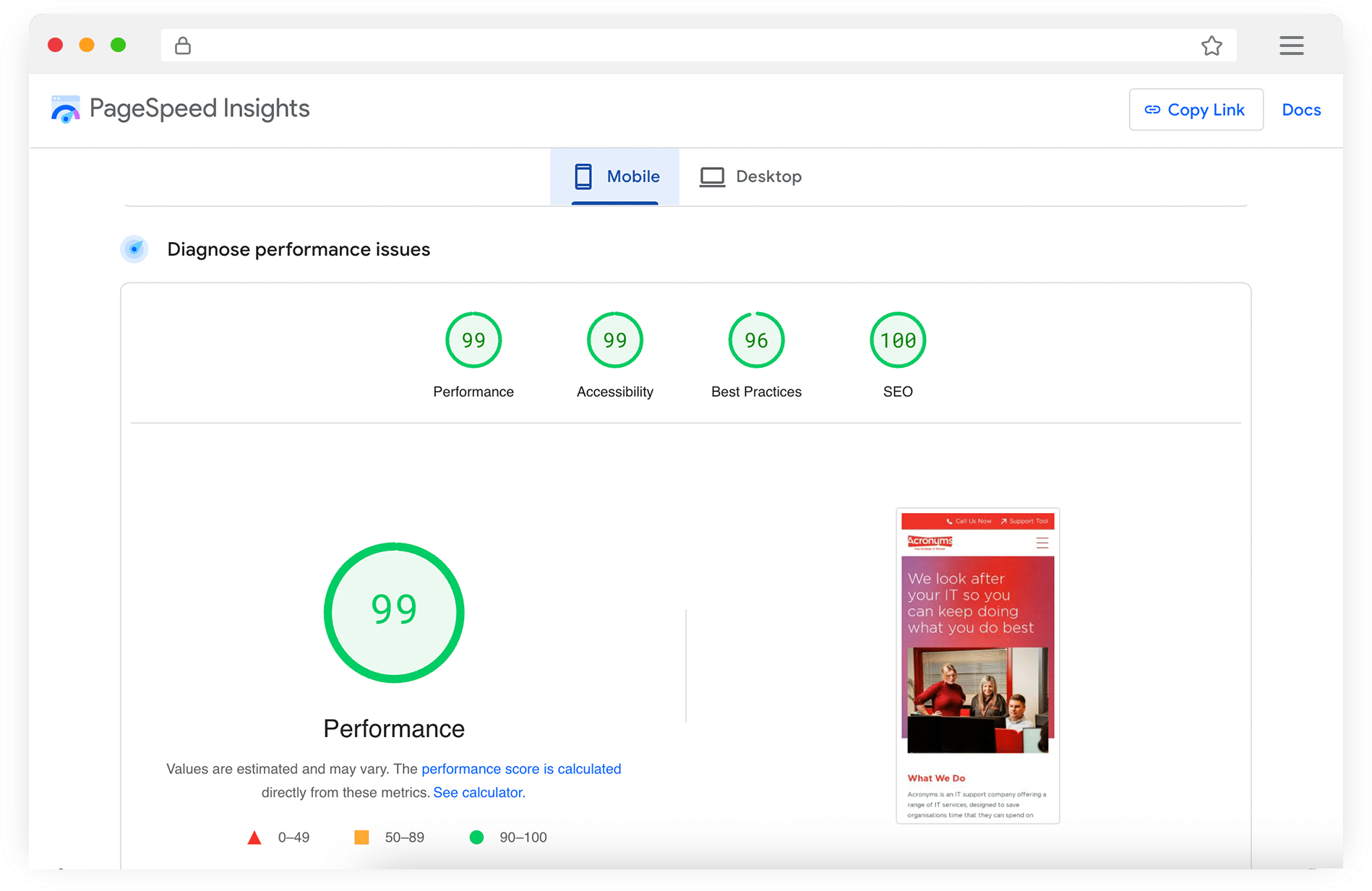
Performance scores from Acronyms IT Support, a WordPress site built and hosted by Priority Pixels.
Database queries slow down as your WordPress site accumulates more content, users and plugin complexity. Enterprise hosting tackles this with server-level query optimisation, read replicas for distributing query load and persistent object caching that works. WooCommerce sites with product catalogues and years of order history see the biggest performance gains because transactional queries demand so much more processing power than basic content requests. The connection between your hosting choices and WooCommerce development decisions affects performance more than most businesses expect.
UK Data Residency and GDPR Considerations
Server location affects your GDPR compliance if you’re collecting personal data from UK visitors through contact forms, user accounts, ecommerce transactions or analytics. UK data centres make your compliance headaches disappear overnight. But store data anywhere without proper UK GDPR adequacy decisions and you’ll need transfer mechanisms in place. The ICO’s UK GDPR guidance spells out what you need to know.
Any reputable enterprise provider will tell you exactly where your data lives and what their processing agreement covers. Can’t get a straight answer? Walk away.
Don’t forget about backup locations either. Those replicated backups sitting in some far-off jurisdiction without proper protections count as international transfers too. Ask these questions during your evaluation process because finding out during an audit is too late.
Total Cost of Ownership
Enterprise hosting costs more upfront than your standard managed package. But here’s what most people miss when they’re comparing monthly prices: all the that cheaper hosting doesn’t cover and all the headaches it won’t solve for you.
Your developers end up burning hours on server problems instead of building things. Slow deployments, caching bugs, random server hiccups that need investigating. Enterprise hosting cuts through that noise with proper staging setups, Git workflows and support teams who know what they’re doing.
WooCommerce site crashes during Black Friday and you’ve just lost more revenue than the hosting upgrade would’ve cost you for an entire year. Get breached and you’re not just dealing with fixing the technical damage. There’s ICO notifications to handle, potential investigations, your reputation taking a battering and customers who might want compensation. Proper enterprise security controls make this whole situation much less likely to happen in the first place.
Support Expectations at Enterprise Level
Enterprise hosting support goes way beyond just getting faster replies to your tickets. Quick responses matter, but what really counts is having access to people who know what they’re talking about and can build a proper working relationship with your team.
You’ll get a dedicated account manager who knows your setup inside out. They understand how your infrastructure works, what makes your site tick and what your business needs from the hosting.
- 15-minute response guarantees for critical infrastructure problems
- Dedicated account manager who knows your specific setup
- Continuous monitoring that catches issues before they affect visitors
- Capacity planning support ahead of product launches and traffic events
- Direct access to WordPress-specialist engineers, not general support staff
Proper SLAs mean real accountability with teeth. We’re talking 15-minute response guarantees for critical problems and one-hour commitments for high-priority issues, backed by contracts that include escalation procedures and financial penalties when things go wrong.
But here’s where enterprise hosting really shines. The monitoring systems catch problems before you even know they exist, which means the support team can jump in and fix server resource issues or slow database queries before your visitors notice anything’s wrong.
Good hosting partners don’t just hand you the keys and disappear. When you’re gearing up for a product launch that could bring serious traffic spikes, having infrastructure engineers available for capacity planning advice stops those nasty surprises that only show up when your site’s getting hammered. We provide technical SEO services right alongside hosting because performance, infrastructure and search visibility work better when they’re planned together.
Planning a Migration to Enterprise Hosting
Switching to enterprise hosting isn’t something you rush into over a weekend. Before you touch anything, audit your current setup completely. Every plugin gets documented. Every theme tweak, server setting, cron job and third-party connection needs recording. That inventory becomes your migration roadmap and you’ll thank yourself later for being thorough.
DNS propagation trips up more people than it should. You update those DNS records to point at the new hosting and suddenly you’re in this weird 48-hour window where some visitors hit the old server while others reach the new one. Drop your DNS TTL values beforehand and keep that old server running until propagation finishes completely.
WooCommerce stores with years of order history present the biggest headaches during database migration. Orders keep flowing in while you’re moving everything across, which means your export becomes outdated before you’ve even finished the transfer. Enterprise providers worth their salt will keep both environments synced right up until you flip the DNS switch.
Get your SSL certificates sorted on the new hosting before you point DNS anywhere. Testing everything once migration wraps up isn’t optional. Forms, search functions, user logins, checkout flows, payment gateways, CRM connections and email platforms all need checking. Don’t forget to test caching behaviour and load times across mobile and desktop devices because performance issues have a nasty habit of only showing up after you’ve declared victory.
Why Professional Migration Support Matters

Smart organisations hand the whole migration over to enterprise WordPress development specialists rather than risk their uptime and data. It costs money upfront but you’ll save far more by avoiding the inevitable debugging sessions, unexpected downtime and angry customers that come from rushing through a migration without proper experience. WordPress.org’s hosting handbook makes it clear that server configuration forms the foundation of any well-run WordPress installation, so getting this right during migration shapes everything that comes after.
Good enterprise hosting disappears completely. Traffic spikes don’t bring your site down, pages load fast and your team gets the tools they need to get work done. When it’s working properly, you stop thinking about hosting altogether and just focus on running your business.
FAQs
What makes enterprise WordPress hosting different from standard managed hosting?
Enterprise WordPress hosting provides isolated, dedicated resources rather than sharing server capacity with other websites. This means guaranteed CPU, RAM and I/O allocation so your performance is never affected by what is happening on neighbouring sites. Enterprise hosting also includes high availability architecture that spreads load across multiple application servers, with automatic failover if any component goes down. Staging and deployment workflows allow changes to be tested in mirror environments before going live, with Git-based pipelines for version control and easy rollbacks. Support comes from WordPress-specialist engineers rather than general hosting staff reading scripts. Standard managed hosting handles updates and backups adequately for smaller sites, but it lacks the infrastructure redundancy, scaling capabilities and security compliance that larger organisations require.
When should an organisation move from standard hosting to enterprise WordPress hosting?
Several signs indicate you have outgrown standard managed hosting. Traffic that previously caused no issues starts bringing your site to its knees, particularly during marketing campaigns or seasonal peaks. Your development team is frustrated by manual deployment processes like FTP uploads and cache clearing. Security becomes a concern because shared hosting environments mean a breach on another site could affect yours. You need compliance certifications that shared environments cannot provide, or your organisation handles sensitive data that requires dedicated security measures. If your site generates significant revenue and downtime means measurable financial losses, the reliability guarantees and SLA-backed response times of enterprise hosting become a business necessity rather than an optional upgrade.
How does enterprise WordPress hosting handle traffic spikes?
Enterprise hosting platforms use horizontal auto-scaling, which means additional application servers are brought online automatically when traffic increases beyond normal levels. This contrasts with standard hosting where you would need to manually upgrade your plan or risk the site going down. Load is distributed across multiple servers so no single point of failure can take the entire site offline. Enterprise hosting also typically includes full-page caching, object caching through Redis or Memcached and an integrated CDN to serve static assets from edge locations close to your visitors. Together, these features mean your site can absorb sudden traffic surges from marketing campaigns, media coverage or seasonal demand without degradation in performance or availability.

Co-Founder at Priority Pixels
Paul leads on development and technical SEO at Priority Pixels, bringing over 20 years of experience in web and IT. He specialises in building fast, scalable WordPress websites and shaping SEO strategies that deliver long-term results. He’s also a driving force behind the agency’s push into accessibility and AI-driven optimisation.


 Nathan Yendle | 02/10/2026



